Design system

Every page is built from these sections.

49 sections and 38 variants. To ask for a change, name the section and its variant, and say what to set.

Looking for

Start from what you want the page to do.

You wantUse
The top of a pageThe hero: a title, a line under it and buttons. It can carry a picture of the product to the right, or open a document prepared for one reader.
The product, big, at the top of the pageThe hero's stacked form: the title, one line and one button, then the product as one full-width panel under them. Beside the copy is the standard form.
FeaturesTwo or three points side by side. For the parts of one whole, each in a box, use the card grid's parts variant.
How it works, step by stepNumbered steps left to right. Steps with long text stack: the standard workflow.
Before and afterOne line per topic: the old way, an arrow, the new way. A box per topic is the card grid's compare variant.
TestimonialsOn the homepage, the testimonial-accordion piece. Inside a page, the card grid's quote variant.
A testimonial carousel or slideshowOne quote at a time with arrows, dots and a swipe, never moving on its own: Framer's Slideshow.
A row of client faces I can swipeSeveral named clients side by side in a row that scrolls sideways: Framer's Carousel.
One big quote with resultsOne quote given a panel, with up to two figures from an approved source.
Client logosIn a panel. A plain row is the logo row; moving across the page is the client-marquee piece.
Numbers that prove itThree or four figures with their labels. They count up as they arrive; set still for figures that should simply be read.
TeamCards, one per person, each with their photo, their role, their name and a line about them.
PricingThe price, what it is for, one line on what it covers, and its terms.
Questions and answersThree to six questions, each answer opening under it.
A button to the next stepOne bordered card with a title, a line and the link. A row of buttons on a closer is actions.
A sign-up or a surveyQuestions a visitor answers and sends, numbered or plain.
A story or a case studyTwo to eight short paragraphs. A full case study is a customer page built from story, stats and a quote.
A list of articlesThe newest two or three as cards. The rest as a list: the standard entries.
A picture of the productOne registered screenshot of our product. Several jobs on tabs is the demo.
A YouTube, Loom or Vimeo videoThe video's title and a play mark, or a still from this site; nothing loads from the host until the reader presses play: Framer's YouTube.
A map, a booking calendar or another embedA page from a listed host, loaded on the reader's press, and after consent where the host collects data: Framer's Embed.
A bento grid of the productProduct views in wide and narrow cells, each with a name and a line: Framer's Bento Expand.
A picture that stays while the steps scrollThree to five steps beside one held picture that changes with each step: Framer's Sticky Scroll.
A before and after sliderTwo views of one screen with a divider to drag, click or move with the keys: Framer's Before-After Slide.
Hotspots on a screenshotNumbered points on a product view, each opening a short note: Framer's Picture Points.
A line that draws itselfA drawing joining a few named steps, drawn once as it arrives: Framer's Animator.

The top of a page

What a visitor sees first: the title, the line under it, and a button or a picture of the product.

Hero

Ask for it as hero

The top of every page: a label, the title and one line under it, then a button, a picture of the product beside the copy or under it, or the facts a private document opens on. Every page has exactly one.

Form Title and buttons

The top of a marketing page: a label, the title, one line under it and up to two buttons. It is the form a hero takes with no cover and no aside.

The operating system

One company, one system.

People direct, agents execute, and knowledge compounds.
This example sets eyebrow, title, accent, statement, cta; each of its cta sets href, label.

The settings for this example
{
  "eyebrow": "The operating system",
  "title": "One company, one system.",
  "accent": "one system.",
  "statement": "People direct, agents execute, and knowledge compounds.",
  "cta": [
    {
      "href": "/demo",
      "label": "Book a demo"
    },
    {
      "href": "/overview",
      "label": "Read the overview"
    }
  ]
}

Form With a picture of the product

The same top, with a picture of our product to the right of the copy from the desktop up, and under it on a phone. Setting aside chooses it.

The operating system

One company, one system.

People direct, agents execute, and knowledge compounds.
In Claude Code, three sessions run in turn: the executive assistant agent's morning brief, the BI agent's variance against budget, and the sales agent's intel on a prospect, each ending on a draft to review.

This example sets eyebrow, title, accent, statement, aside.

The settings for this example
{
  "eyebrow": "The operating system",
  "title": "One company, one system.",
  "accent": "one system.",
  "statement": "People direct, agents execute, and knowledge compounds.",
  "aside": {
    "type": "product-shot",
    "shot": "session-all",
    "caption": false
  }
}

Form With the product under the title

A page where the product is the first thing a reader judges: the title, one line and one button, then the product as one full-width panel under them, playing one session once and holding its finished frame. Setting view to "stacked", with an aside, chooses it.

The operating system

One company, one system.

People direct, agents execute, and knowledge compounds.

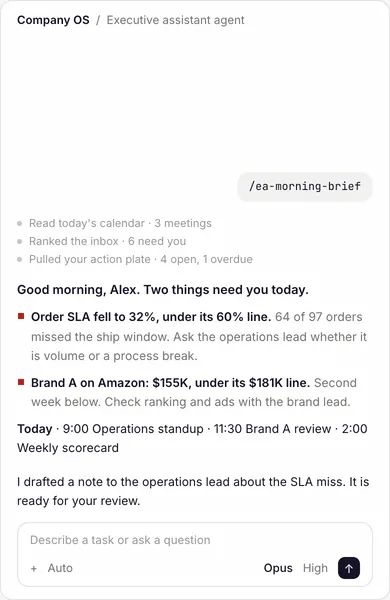
In Claude Code, the person runs /ea-morning-brief; the executive assistant agent reads the calendar, ranks the inbox, pulls the action plate and checks the scorecard, then shows two figures below their line with the action for each, the day's meetings, and a draft to review.

This example sets eyebrow, title, accent, statement, cta, aside.

The settings for this example
{
  "view": "stacked",
  "eyebrow": "The operating system",
  "title": "One company, one system.",
  "accent": "one system.",
  "statement": "People direct, agents execute, and knowledge compounds.",
  "cta": {
    "href": "/demo",
    "label": "Book a demo"
  },
  "aside": {
    "type": "product-shot",
    "shot": "session-brief",
    "caption": false
  }
}

Form Private overview

A document prepared for one reader: who it is for, who prepared it and when, then the title. Setting cover chooses it.

Private overview
Prepared for
The reader’s company
The reader’s name and role
Prepared by
harperOS
Date
October 2026
The overview

How your company could run on one system.

What we would build first, and why.

This example sets eyebrow, cover, label, title, accent, statement; each of its cover sets label, name, value.

The settings for this example
{
  "eyebrow": "Private overview",
  "cover": [
    {
      "label": "Prepared for",
      "name": "The reader's company",
      "value": "The reader's name and role"
    },
    {
      "label": "Prepared by",
      "value": "harperOS"
    },
    {
      "label": "Date",
      "value": "October 2026"
    }
  ],
  "label": "The overview",
  "title": "How your company could run on one system.",
  "accent": "one system.",
  "statement": "What we would build first, and why."
}

Options

OptionWhat it setsWhat it takesNeeded
eyebrowThe small label above the title.wordsOptional
titleThe title.wordsAlways
accentThe words of the title set in the accent color.words, or a list of linesOptional
statementThe line under the title, two sentences at most.wordsOptional
labelA small label above it, or the name a screen reader announces.wordsOptional
coverThe facts a private overview opens on: who it is for, who prepared it, when.
Across its variants, each can hold: label, name, value, today
a list of entriesOptional
blocksSections drawn under the title, inside the hero, written as on a page.a list of as in the example's settingsOptional
bodyThe text under the title.wordsOptional
monoA small line in the label face under the title.wordsOptional
listA short list under the title.a list of wordsOptional
metaFacts listed under the title.
Across its variants, each can hold: label, name, value, today
a list of entriesOptional
noteOne small reassuring line, with no link.wordsOptional
parentThe page this one belongs under, shown above the label.
Across its variants, each can hold: href, label
a group of detailsOptional
ctaA button, or a button and a quieter one beside it.
Across its variants, each can hold: href, label
one entry, or a list of themOptional
asideA picture of our product to the right of the title, or under it when the hero is stacked: { type: "product-shot", shot: the picture's name }.as in the example's settingsOptional
displaySet the title at the largest size.yes or noOptional
scopeThe proposal form that opens on its scope.yes or noOptional

Headings

A heading that opens a part of a page.

Function header

Ask for it as fnhead

The heading of a business function: its name, icon, kicker and lede.

The standard form

Its one form.

Sales

This example sets icon, name.

The settings for this example
{
  "type": "fnhead",
  "icon": "trend",
  "name": "Sales"
}

Options

OptionWhat it setsWhat it takesNeeded
iconWhich icon marks it.wordsOptional
nameThe business function's name.wordsAlways
rungSet it as a smaller heading inside a section.a numberOptional
labelA short label before the name, on the smaller heading.wordsOptional
kickThe small label above the title.wordsOptional
ledeThe line that says what it is about.wordsOptional

Features and how it works

What the product does, its parts, and how work moves through it.

Cards

Ask for it as cards

A set of short titled points, each in its own box, side by side.

The standard form

Drawn this way when no variant is named.

Pierre Merzeau
Co-Founder & CTO
Pierre Merzeau
Director of Engineering at XBTO. CTO and co-founder at Ouro Capital.
Patrick Adams
Co-Founder, President & CMO
Patrick Adams
Led marketing organizations at PayPal, Victoria’s Secret, Chase and Citibank.

This example sets items; each of its items sets photo, kick, title, body, meta.

The settings for this example
{
  "type": "cards",
  "items": [
    {
      "photo": {
        "src": "/team-pierre-flat.png",
        "alt": "Pierre Merzeau"
      },
      "kick": "Co-Founder & CTO",
      "title": "Pierre Merzeau",
      "body": "Director of Engineering at XBTO. CTO and co-founder at Ouro Capital.",
      "meta": "[LinkedIn](https://www.linkedin.com/in/pierre-merzeau-96028185/)"
    },
    {
      "photo": {
        "src": "/team-patrick-flat.png",
        "alt": "Patrick Adams"
      },
      "kick": "Co-Founder, President & CMO",
      "title": "Patrick Adams",
      "body": "Led marketing organizations at PayPal, Victoria's Secret, Chase and Citibank.",
      "meta": "[LinkedIn](https://www.linkedin.com/in/patrickadams/)"
    }
  ]
}

Variant agent

An agent and the person who owns it, one card each.

Finance

Month-end close

Reconciles the accounts and drafts the close for review.

Controller

Sales

Account research

Reads a prospect’s filings and news before every call.

Account executive

This example sets items; each of its items sets kick, name, body, owner.

The settings for this example
{
  "type": "cards",
  "view": "agent",
  "items": [
    {
      "kick": "Finance",
      "name": "Month-end close",
      "body": "Reconciles the accounts and drafts the close for review.",
      "owner": "Controller"
    },
    {
      "kick": "Sales",
      "name": "Account research",
      "body": "Reads a prospect's filings and news before every call.",
      "owner": "Account executive"
    }
  ]
}

Options

OptionWhat it setsWhat it takesNeeded
itemsThe things it shows, one per entry.
Across its variants, each can hold: kick, bullets, owner, body, text, foot, title, meta, price, tag, name, quote, photo
a list of entriesAlways
columnsHow many sit side by side on a desktop.a numberOptional
labelA small label above it, or the name a screen reader announces.wordsOptional

Product shot

Ask for it as product-shot

One screenshot or animated image of the product, with an optional caption.

The standard form

Its one form.

session/communication-safety.md
1# communication-safety2 3Customer communications require coordinator review. Draft first, never auto-send.4 5The pipeline for any outbound communication (email, Slack, Teams): produce a draft → present it in chat for review → wait for explicit approval → send only after approval.6 7"APPROVED" is the only valid approval signal. Silence, nodding, or implicit consent are not approval.8 9Never send a communication that has not been explicitly approved by the user. Never send a communication from a tool call in the same step as drafting it.
A rule from our own OS, word for word: no message leaves until a person approves it.

This example sets shot.

The settings for this example
{
  "type": "product-shot",
  "shot": "rule-draft-first"
}

Options

OptionWhat it setsWhat it takesNeeded
shotWhich registered picture of our product it shows.an imageAlways
captionOne line under it.yes or noOptional

Demo

Ask for it as demo

Two to four use cases on tabs above a session in the app the product runs in: the product doing several jobs.

The standard form

Its one form.

In Claude Code, the person runs /ea-morning-brief; the executive assistant agent reads the calendar, ranks the inbox, pulls the action plate and checks the scorecard, then shows two figures below their line with the action for each, the day's meetings, and a draft to review.
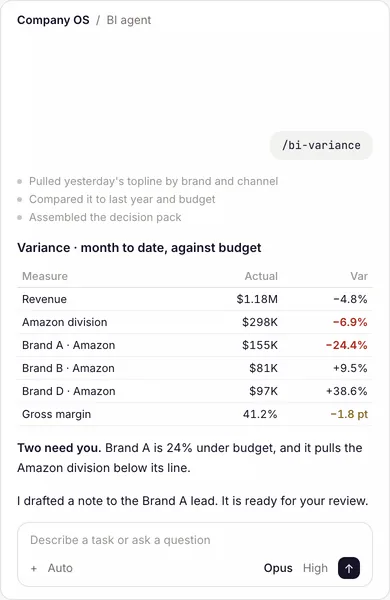
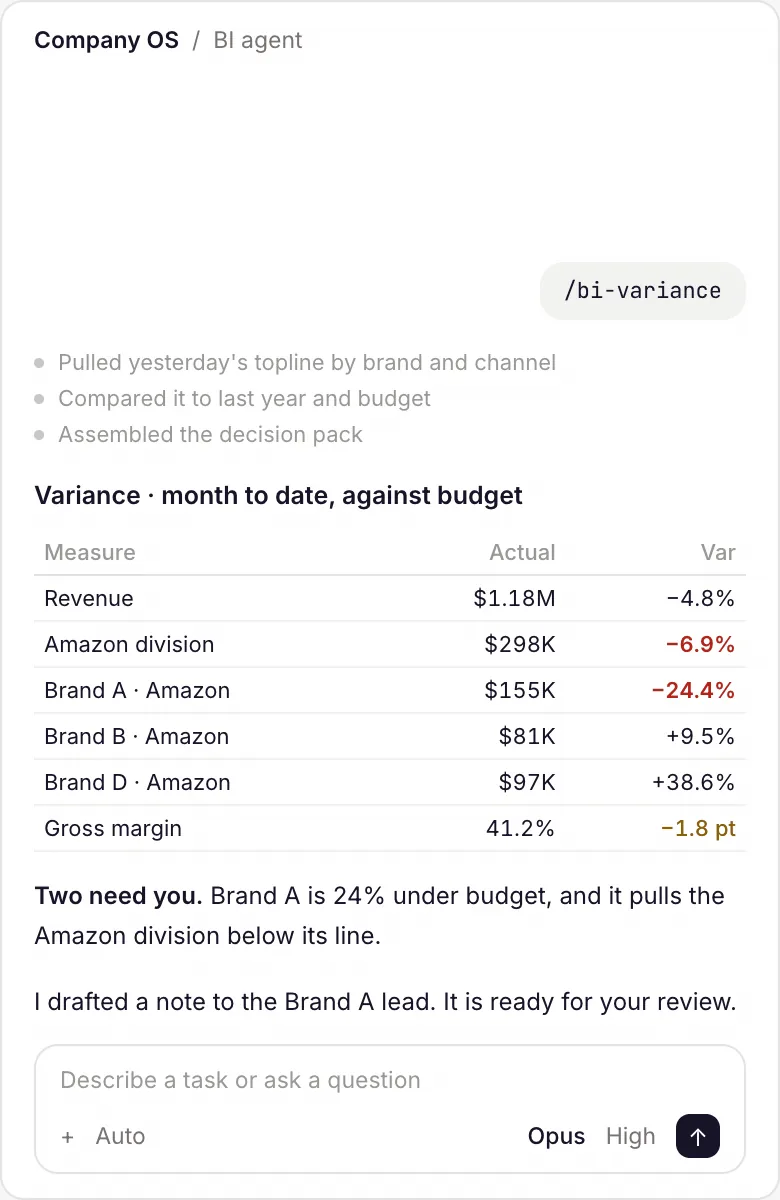
In Claude Code, the person runs /bi-variance; the BI agent pulls yesterday's topline by brand and channel, compares it to last year and budget, and shows the variance table with the two lines that need attention and a draft to review.

Shown on example data, with every name and figure changed.

  • Morning briefAsk for your day, and get what needs you with the action for each.
  • Actuals to budgetSee every line against its budget, and the two that need you.

This example sets caption, items; each of its items sets label, text, shot.

The settings for this example
{
  "type": "demo",
  "caption": "Shown on example data, with every name and figure changed.",
  "items": [
    {
      "label": "Morning brief",
      "text": "Ask for your day, and get what needs you with the action for each.",
      "shot": "session-brief"
    },
    {
      "label": "Actuals to budget",
      "text": "See every line against its budget, and the two that need you.",
      "shot": "session-budget"
    }
  ]
}

Options

OptionWhat it setsWhat it takesNeeded
itemsThe things it shows, one per entry.
Across its variants, each can hold: label, text, shot
a list of entriesAlways
captionOne line under it.wordsOptional

Embed

Ask for it as embed

A drawn figure or interactive piece from the embed library, named by file.

The standard form

Its one form.

Powering 300+
users at

FintechWealth ManagementAdTechCryptoDisaster RestorationConsumer GoodsConstruction SuppliesBeautyeCommerceCreative AgencyFintechWealth ManagementAdTechCryptoDisaster RestorationConsumer GoodsConstruction SuppliesBeautyeCommerceCreative Agency

This example sets name.

The settings for this example
{
  "type": "embed",
  "name": "client-marquee"
}

The pieces you can name:

NameWhat it is
client-marqueethe proof strip, led by its label.
inside-outthe animated mark for "Built from the inside".
os-anatomywhat "an operating system" means, in three parts.
os-anatomy-cadalystCadalyst's operating system in three parts.
os-anatomy-partandsumPart and Sum's operating system in three parts.
repo-treewhere everything lives: one repository in the client's own GitHub, the harness.
testimonial-accordionthe client testimonials as a row of panels: one open, the rest closed.
testimonial-wallthe community marquee: partner testimonials with photos.
three-circleswhat running on AI takes, the way MC draws it with his hands in every first.
three-layershow a company runs on the system: each person's own agent on top, the function.

Options

OptionWhat it setsWhat it takesNeeded
nameWhich registered piece it shows, such as the testimonials.wordsAlways
captionOne line under it.wordsOptional

Boxes

Ask for it as boxes

A few short items in outlined boxes, with an optional lead line.

The standard form

Its one form.

Build and deploy

Months one and two

Change management

Months three and four

Growth

Month five on

This example sets items; each of its items sets kick, value.

The settings for this example
{
  "type": "boxes",
  "items": [
    {
      "kick": "Build and deploy",
      "value": "Months one and two"
    },
    {
      "kick": "Change management",
      "value": "Months three and four"
    },
    {
      "kick": "Growth",
      "value": "Month five on"
    }
  ]
}

Options

OptionWhat it setsWhat it takesNeeded
leadSet the price first, at the large size.yes or noOptional
itemsThe things it shows, one per entry.
Across its variants, each can hold: kick, bullets, value, price
a list of entriesAlways
columnsHow many sit side by side on a desktop.a numberOptional

Agent specification

Ask for it as agent-spec

An agent's purpose, inputs, outputs and owner, as a structured card.

The standard form

Its one form.

Account manager

Keep every account current, so no client goes a week without a touch.

Pain point

Each client’s history lives with the person who holds the relationship.

Workflow
Today

Follow-ups live in one person’s inbox.

Tomorrow

Every follow-up arrives drafted and tracked in the morning queue.

Adversary agents
Source verifier
Systems it connects to
GmailAirtable account store
Proposed owner

Sales operations

This example sets items; each of its items sets layout, name, lede, rows.

The settings for this example
{
  "type": "agent-spec",
  "items": [
    {
      "layout": "rail",
      "name": "Account manager",
      "lede": "Keep every account current, so no client goes a week without a touch.",
      "rows": [
        {
          "label": "Pain point",
          "value": "Each client's history lives with the person who holds the relationship."
        },
        {
          "label": "Workflow",
          "tt": {
            "today": "Follow-ups live in one person's inbox.",
            "tomorrow": "Every follow-up arrives drafted and tracked in the morning queue."
          }
        },
        {
          "label": "Adversary agents",
          "chips": [
            "Source verifier"
          ]
        },
        {
          "label": "Systems it connects to",
          "chips": [
            "Gmail",
            "Airtable account store"
          ]
        },
        {
          "label": "Proposed owner",
          "owner": "Sales operations"
        }
      ]
    }
  ]
}

Options

OptionWhat it setsWhat it takesNeeded
itemsThe things it shows, one per entry.
Across its variants, each can hold: layout, name, lede, kick, rows
a list of entriesAlways

Panel

Ask for it as panel

A grouped panel of items under a header (used on one page).

The standard form

Its one form.

Agents by function

01Finance

ClosePayablesReporting

02Sales

ResearchProposals

This example sets header, groups; each of its groups sets num, label, chips.

The settings for this example
{
  "type": "panel",
  "header": "Agents by function",
  "groups": [
    {
      "num": "01",
      "label": "Finance",
      "chips": [
        "Close",
        "Payables",
        "Reporting"
      ]
    },
    {
      "num": "02",
      "label": "Sales",
      "chips": [
        "Research",
        "Proposals"
      ]
    }
  ]
}

Options

OptionWhat it setsWhat it takesNeeded
headerThe heading over the groups.wordsAlways
groupsThe groups it holds, each with its own heading.
Across its variants, each can hold: num, label, chips
a list of entriesAlways

Flow diagram

Ask for it as flow

Nodes joined by arrows, showing how work moves (used on one page).

The standard form

Its one form.

This example sets aria, nodes; each of its nodes sets label, text.

The settings for this example
{
  "type": "flow",
  "aria": "A request moves from a person to an agent and back",
  "nodes": [
    {
      "label": "Person",
      "text": "Asks in plain words."
    },
    {
      "label": "Agent",
      "text": "Does the work with the company's knowledge."
    },
    {
      "label": "Person",
      "text": "Reviews and decides."
    }
  ]
}

Options

OptionWhat it setsWhat it takesNeeded
ariaWhat a screen reader announces for the diagram.wordsAlways
nodesThe steps of the diagram, top to bottom.
Across its variants, each can hold: label, text, chips, joined, sub
a list of entriesAlways

Point row

Ask for it as point-row

Titled points in a row, inline or stacked, each with an optional number.

The standard form

Drawn this way when no variant is named.

People direct

You are the one thinking and deciding what comes next.

Agents execute

A person plus their own agent, and one plus one makes three.

Knowledge compounds

What your best person knows, captured once, for everyone.

This example sets items; each of its items sets icon, title, text.

The settings for this example
{
  "type": "point-row",
  "items": [
    {
      "icon": "compass",
      "title": "People direct",
      "text": "You are the one thinking and deciding what comes next."
    },
    {
      "icon": "play",
      "title": "Agents execute",
      "text": "A person plus their own agent, and one plus one makes three."
    },
    {
      "icon": "layers",
      "title": "Knowledge compounds",
      "text": "What your best person knows, captured once, for everyone."
    }
  ]
}

Variant inline

A long ordered list, the marker beside each title, each title linking to its section.

1

Deploy the operating system

We set up your workspace in your own environment and connect your systems.

2

Capture and codify the knowledge

We capture what your team knows and how it works.

This example sets items; each of its items sets num, href, title, text.

The settings for this example
{
  "type": "point-row",
  "view": "inline",
  "items": [
    {
      "num": 1,
      "href": "#pillar-1",
      "title": "Deploy the operating system",
      "text": "We set up your workspace in your own environment and connect your systems."
    },
    {
      "num": 2,
      "href": "#pillar-2",
      "title": "Capture and codify the knowledge",
      "text": "We capture what your team knows and how it works."
    }
  ]
}

Variant stack

Topics one under another, for points that each need a paragraph.

Not a chatbot

harperOS does not sit behind a prompt box waiting for questions. Agents are scheduled, triggered, and workflow-bound.

Not a model wrapper

Models are interchangeable. The operating system is what compounds — knowledge, skills, rules, and the workflows that connect them.

Not a vertical SaaS

harperOS is horizontal — it runs every department inside one operating layer, not a single function inside one application.

Not a pilot

Built inside live operations from day one. Deployed against real work, with real teams, in production. No sandbox phase.

This example sets items; each of its items sets icon, title, text.

The settings for this example
{
  "type": "point-row",
  "view": "stack",
  "items": [
    {
      "icon": "chat",
      "title": "Not a chatbot",
      "text": "harperOS does not sit behind a prompt box waiting for questions. Agents are scheduled, triggered, and workflow-bound."
    },
    {
      "icon": "layers",
      "title": "Not a model wrapper",
      "text": "Models are interchangeable. The operating system is what compounds — knowledge, skills, rules, and the workflows that connect them."
    },
    {
      "icon": "grid",
      "title": "Not a vertical SaaS",
      "text": "harperOS is horizontal — it runs every department inside one operating layer, not a single function inside one application."
    },
    {
      "icon": "play",
      "title": "Not a pilot",
      "text": "Built inside live operations from day one. Deployed against real work, with real teams, in production. No sandbox phase."
    }
  ]
}

Options

OptionWhat it setsWhat it takesNeeded
itemsThe things it shows, one per entry.
Across its variants, each can hold: icon, title, text, num, href
a list of entriesAlways

Card grid

Ask for it as card-grid

A grid of cards, in one of six layouts: function, org chart, parts, quote, shift or compare.

Variant compare

A before and an after, one card per aspect.

Expertise

FromLiving in a few key people’s headsToCaptured from your best people

Getting the work done

FromBy hand, or in each person’s own AI chatToAgents running the encoded way

Quality

FromNot always predictableToYour best way every time

This example sets items; each of its items sets icon, title, from, to.

The settings for this example
{
  "type": "card-grid",
  "view": "compare",
  "items": [
    {
      "icon": "person",
      "title": "Expertise",
      "from": "Living in a few key people's heads",
      "to": "Captured from your best people"
    },
    {
      "icon": "bolt",
      "title": "Getting the work done",
      "from": "By hand, or in each person's own AI chat",
      "to": "Agents running the encoded way"
    },
    {
      "icon": "check",
      "title": "Quality",
      "from": "Not always predictable",
      "to": "Your best way every time"
    }
  ]
}

Variant function

A business function and the agents it holds, each agent an equal cell.

Sales

  • Sales representative
  • Account manager
  • Sales operations

Marketing

  • Growth marketer
  • Social media manager
  • Content strategist

Finance

  • Controller
  • Financial analyst
  • Accounts receivable

This example sets boxes, items; each of its items sets icon, title, agents.

The settings for this example
{
  "type": "card-grid",
  "view": "function",
  "boxes": "plain",
  "items": [
    {
      "icon": "trend",
      "title": "Sales",
      "agents": [
        "Sales representative",
        "Account manager",
        "Sales operations"
      ]
    },
    {
      "icon": "megaphone",
      "title": "Marketing",
      "agents": [
        "Growth marketer",
        "Social media manager",
        "Content strategist"
      ]
    },
    {
      "icon": "banknote",
      "title": "Finance",
      "agents": [
        "Controller",
        "Financial analyst",
        "Accounts receivable"
      ]
    }
  ]
}

Variant org

The functions as a line-drawn org chart: the company on top, a column per function, its agents below.

Your company
Sales
  • Sales representative
  • Account manager
  • Sales operations
Marketing
  • Growth marketer
  • Social media manager
  • Content strategist
Finance
  • Controller
  • Financial analyst
  • Accounts receivable

This example sets top, items; each of its items sets icon, title, agents.

The settings for this example
{
  "type": "card-grid",
  "view": "org",
  "top": "Your company",
  "items": [
    {
      "icon": "trend",
      "title": "Sales",
      "agents": [
        "Sales representative",
        "Account manager",
        "Sales operations"
      ]
    },
    {
      "icon": "megaphone",
      "title": "Marketing",
      "agents": [
        "Growth marketer",
        "Social media manager",
        "Content strategist"
      ]
    },
    {
      "icon": "banknote",
      "title": "Finance",
      "agents": [
        "Controller",
        "Financial analyst",
        "Accounts receivable"
      ]
    }
  ]
}

Variant parts

The parts of a whole, each card with a footer tying it to an idea named elsewhere on the page.

System

The operating system all the work runs on, in your environment.
Knowledge compounds

Functions

Every function you choose, built end to end.
Agents execute

People

Your team, trained to run their work through agents.
People direct

This example sets items; each of its items sets icon, title, text, footer.

The settings for this example
{
  "type": "card-grid",
  "view": "parts",
  "items": [
    {
      "icon": "chip",
      "title": "System",
      "text": "The operating system all the work runs on, in your environment.",
      "footer": "Knowledge compounds"
    },
    {
      "icon": "grid",
      "title": "Functions",
      "text": "Every function you choose, built end to end.",
      "footer": "Agents execute"
    },
    {
      "icon": "cap",
      "title": "People",
      "text": "Your team, trained to run their work through agents.",
      "footer": "People direct"
    }
  ]
}

Variant quote

Someone else's words, with their portrait when we have one.

Six weeks of work, done in three hours.

Viral Shah · CFO, Advanced DRI

1,400 companies — no one’s doing it. Not even close.

Matt Lipman · CEO, Capstone

This example sets items; each of its items sets quote, by.

The settings for this example
{
  "type": "card-grid",
  "view": "quote",
  "items": [
    {
      "quote": "Six weeks of work, done in three hours.",
      "by": "Viral Shah · CFO, Advanced DRI"
    },
    {
      "quote": "1,400 companies — no one's doing it. Not even close.",
      "by": "Matt Lipman · CEO, Capstone"
    }
  ]
}

Variant roster

The function cards as one line each: the function, then its agents.

Sales

  • Sales representative
  • Account manager
  • Sales operations

Marketing

  • Growth marketer
  • Social media manager
  • Content strategist

Finance

  • Controller
  • Financial analyst
  • Accounts receivable

This example sets items; each of its items sets icon, title, agents.

The settings for this example
{
  "type": "card-grid",
  "view": "roster",
  "items": [
    {
      "icon": "trend",
      "title": "Sales",
      "agents": [
        "Sales representative",
        "Account manager",
        "Sales operations"
      ]
    },
    {
      "icon": "megaphone",
      "title": "Marketing",
      "agents": [
        "Growth marketer",
        "Social media manager",
        "Content strategist"
      ]
    },
    {
      "icon": "banknote",
      "title": "Finance",
      "agents": [
        "Controller",
        "Financial analyst",
        "Accounts receivable"
      ]
    }
  ]
}

Variant shift

The compare cards as one line each: the aspect, the old way in gray, an arrow, the new way.

Expertise

From Living in a few key people’s heads

To Captured from your best people

Getting the work done

From By hand, or in each person’s own AI chat

To Agents running the encoded way

Quality

From Not always predictable

To Your best way every time

This example sets items; each of its items sets icon, title, from, to.

The settings for this example
{
  "type": "card-grid",
  "view": "shift",
  "items": [
    {
      "icon": "person",
      "title": "Expertise",
      "from": "Living in a few key people's heads",
      "to": "Captured from your best people"
    },
    {
      "icon": "bolt",
      "title": "Getting the work done",
      "from": "By hand, or in each person's own AI chat",
      "to": "Agents running the encoded way"
    },
    {
      "icon": "check",
      "title": "Quality",
      "from": "Not always predictable",
      "to": "Your best way every time"
    }
  ]
}

Variant versus

A comparison table: the aspect, the old way and the new way in two named columns, the new one marked; on a phone a two-option switch above the rows swaps each line in place.

AspectTodayWith harperOS
ExpertiseLiving in a few key people’s headsCaptured from your best people
Getting the work doneBy hand, or in each person’s own AI chatAgents running the encoded way
QualityNot always predictableYour best way every time

This example sets labels, items; each of its items sets icon, title, from, to.

The settings for this example
{
  "type": "card-grid",
  "view": "versus",
  "labels": [
    "Today",
    "With harperOS"
  ],
  "items": [
    {
      "icon": "person",
      "title": "Expertise",
      "from": "Living in a few key people's heads",
      "to": "Captured from your best people"
    },
    {
      "icon": "bolt",
      "title": "Getting the work done",
      "from": "By hand, or in each person's own AI chat",
      "to": "Agents running the encoded way"
    },
    {
      "icon": "check",
      "title": "Quality",
      "from": "Not always predictable",
      "to": "Your best way every time"
    }
  ]
}

Options

OptionWhat it setsWhat it takesNeeded
labelsThe two column names of a comparison table, the old way first, then the new way.a list of wordsOptional
itemsThe things it shows, one per entry.
Across its variants, each can hold: icon, title, from, to, agents, name, role, company, photo, logo, quote, headline, text, by, note, footer, agent, num, purposes
a list of entriesAlways
topThe name at the top of the chart, usually the company.wordsOptional
columnsHow many sit side by side on a desktop.a numberOptional
boxesDraw its parts as boxes: linked to their details, or plain.one of: yes, plainOptional
fillLet the last card fill the row when the count is odd.yes or noOptional
collapsePut the cards behind a toggle with this label, closed until the reader opens it.wordsOptional

Workflow

Ask for it as workflow

The steps of a piece of work, drawn as a flow.

The standard form

Drawn this way when no variant is named.

This example sets label, steps; each of its steps sets name, text.

The settings for this example
{
  "type": "workflow",
  "label": "Four steps from a person's request to a reviewed result",
  "steps": [
    {
      "name": "You",
      "text": "Ask for what you need."
    },
    {
      "name": "Your agent",
      "text": "It routes the work to the function it belongs to."
    },
    {
      "name": "Back to you",
      "text": "It comes back done."
    }
  ]
}

Variant across

Three to five numbered steps left to right.

This example sets label, steps; each of its steps sets name, text.

The settings for this example
{
  "type": "workflow",
  "label": "Three steps left to right",
  "view": "across",
  "steps": [
    {
      "name": "Parity",
      "text": "The agent does the task as well as your person did."
    },
    {
      "name": "Verification",
      "text": "A second agent checks the work."
    },
    {
      "name": "Evidence",
      "text": "The sources come back with the work."
    }
  ]
}

Variant branch

One step hands the work to several boxes, which hand it back.

This example sets label, steps; each of its steps sets name, text, fan.

The settings for this example
{
  "type": "workflow",
  "view": "branch",
  "label": "Five steps: you ask; your agent routes the work; a function's agent does it; it comes back to you; it lands in the shared record",
  "steps": [
    {
      "name": "You",
      "text": "Ask for what you need."
    },
    {
      "name": "Your agent",
      "text": "It sends the work to the function it belongs to."
    },
    {
      "fan": {
        "label": "Function agents",
        "items": [
          [
            "trend",
            "Sales"
          ],
          [
            "megaphone",
            "Marketing"
          ],
          [
            "banknote",
            "Finance"
          ]
        ]
      }
    },
    {
      "name": "Back to you",
      "text": "It comes back done. You approve it, or you correct it."
    },
    {
      "name": "The shared record",
      "text": "Everything lands here, available to everyone."
    }
  ]
}

Variant returns

Steps left to right where the last feeds the first.

This example sets label, steps; each of its steps sets name, text.

The settings for this example
{
  "type": "workflow",
  "label": "Steps that return to the first",
  "view": "returns",
  "steps": [
    {
      "name": "Run",
      "text": "The agent runs the task."
    },
    {
      "name": "Review",
      "text": "You read what came back."
    },
    {
      "name": "Calibrate",
      "text": "Your correction is kept."
    }
  ]
}

Options

OptionWhat it setsWhat it takesNeeded
labelA small label above it, or the name a screen reader announces.wordsAlways
stepsThe steps, in order.
Across its variants, each can hold: name, text, fan, when
a list of entriesAlways

Split

Ask for it as split

Points on one side and a product shot or screen on the other.

The standard form

Its one form.

During your day

You direct the work and approve it.

Outside your day

What you set to run keeps going, and waits for you in the morning.

This example sets points, screen; each of its points sets icon, title, text.

The settings for this example
{
  "type": "split",
  "points": [
    {
      "icon": "sun",
      "title": "During your day",
      "text": "You direct the work and approve it."
    },
    {
      "icon": "moon",
      "title": "Outside your day",
      "text": "What you set to run keeps going, and waits for you in the morning."
    }
  ],
  "screen": {
    "label": "An example of the morning review",
    "head": "Example · ready for your review",
    "time": "7:30 AM",
    "rows": [
      {
        "icon": "trend",
        "name": "Weekly sales report",
        "status": "Drafted overnight",
        "state": "Ready"
      },
      {
        "icon": "chat",
        "name": "Four supplier follow‑ups",
        "status": "Drafted, waiting for your yes",
        "state": "Needs you",
        "go": true
      }
    ]
  }
}

Options

OptionWhat it setsWhat it takesNeeded
shotWhich registered picture of our product it shows.an imageOptional
flipPut the picture on the left on a desktop and above the points on a phone, so splits in a row alternate sides.yes or noOptional
captionShow the shot's registered caption under the window, as the homepage's real runs do (A real client run. Names and numbers changed.).yes or noOptional
labelA small label above it, or the name a screen reader announces.wordsOptional
pointsThe points beside the picture.
Across its variants, each can hold: icon, title, text
a list of entriesAlways
screenA simplified picture of the product, in place of a registered one.
Across its variants, each can hold: label, head, time, rows
a group of detailsOptional

Operations list

Ask for it as ops

Operational items in a list (used on one page).

The standard form

Its one form.

Hosting

Your own environment

Model account

Yours, with Anthropic

This example sets items; each of its items sets name, value.

The settings for this example
{
  "type": "ops",
  "items": [
    {
      "name": "Hosting",
      "value": "Your own environment"
    },
    {
      "name": "Model account",
      "value": "Yours, with Anthropic"
    }
  ]
}

Options

OptionWhat it setsWhat it takesNeeded
itemsThe things it shows, one per entry.
Across its variants, each can hold: name, value
a list of entriesAlways

Hosted video

Ask for it as external-video

A recording hosted on Loom, YouTube or Vimeo, shown as its title and a play mark (or a still from this site); the player loads only when the reader presses play (Framer's YouTube, its click-to-load player).

The standard form

Its one form.

A recorded walkthroughYouTube · 10 min. Plays here when you press it; nothing loads from YouTube before then.

This example sets provider, id, title, length.

The settings for this example
{
  "type": "external-video",
  "provider": "youtube",
  "id": "aqz-KE-bpKQ",
  "title": "A recorded walkthrough",
  "length": "10 min"
}

Options

OptionWhat it setsWhat it takesNeeded
providerWhere the recording is hosted: Loom, YouTube or Vimeo.one of: loom, youtube, vimeoAlways
idThe recording's id on that host, never its full address.wordsAlways
titleWhat the recording shows, as its title.wordsAlways
lengthHow long it runs, such as 4 min.wordsOptional
captionA line under the recording.wordsOptional
posterA product shot from this site shown until the press, in place of the plain box.wordsOptional
mutedStart the recording without sound when it is pressed.yes or noOptional

Hosted page

Ask for it as external-embed

A page from a listed provider, such as a map or a booking calendar, shown as its title until the reader presses it; providers that collect data load only after consent (Framer's Embed, held to a list of hosts).

The standard form

Its one form.

A map of Wilmington, DelawareOpenStreetMap. Opens here when you press it; nothing loads from OpenStreetMap before then.

This example sets provider, id, title.

The settings for this example
{
  "type": "external-embed",
  "provider": "openstreetmap",
  "id": "-75.5650,39.7350,-75.5350,39.7550",
  "title": "A map of Wilmington, Delaware"
}

Options

OptionWhat it setsWhat it takesNeeded
providerWhere the page comes from: Google Maps, OpenStreetMap or Calendly.one of: google-maps, openstreetmap, calendlyAlways
idThe place, the map's box or the booking page's name on that host, never a full address.wordsAlways
titleWhat the page shows, as its title.wordsAlways
captionA line under the page.wordsOptional

Bento grid

Ask for it as bento-grid

Product views of different sizes in one grid, each with a name and a line, wide and narrow cells alternating so the set reads as one picture (Framer's Bento Expand and the Advanced Bento Grid).

Variant alternate

Two cells to a row, wide then narrow, then narrow then wide, as Framer's Bento Expand lays them out.

The morning briefYour calendar, inbox and open items, ranked before you start.In Claude Code, the person runs /ea-morning-brief; the executive assistant agent reads the calendar, ranks the inbox, pulls the action plate and checks the scorecard, then shows two figures below their line with the action for each, the day's meetings, and a draft to review.
Actuals to budgetYesterday’s figures against plan, with the two lines that need you.In Claude Code, the person runs /bi-variance; the BI agent pulls yesterday's topline by brand and channel, compares it to last year and budget, and shows the variance table with the two lines that need attention and a draft to review.
Deal intelA prospect read and scored, with the warm path to them.In Claude Code, the person runs /bd-prospect-intel on a company; the sales agent reads its folder and the public record, finds two warm paths, scores the fit, and drafts a note through the warm path.
The Build MasterEach request from a capture session becomes a task, then a skill.In the Build Master, a request from a capture session becomes a task row; its goal, knowledge, skill and checks fill in, and its status turns from manual to agentic.

This example sets items; each of its items sets title, text, shot.

The settings for this example
{
  "type": "bento-grid",
  "view": "alternate",
  "items": [
    {
      "title": "The morning brief",
      "text": "Your calendar, inbox and open items, ranked before you start.",
      "shot": "session-brief"
    },
    {
      "title": "Actuals to budget",
      "text": "Yesterday's figures against plan, with the two lines that need you.",
      "shot": "session-budget"
    },
    {
      "title": "Deal intel",
      "text": "A prospect read and scored, with the warm path to them.",
      "shot": "session-intel"
    },
    {
      "title": "The Build Master",
      "text": "Each request from a capture session becomes a task, then a skill.",
      "shot": "build-master"
    }
  ]
}

Variant spans

A three-column grid where each cell takes one, two or three columns, and every row fills.

Three agents at workA morning brief, a variance and a deal read, one after another.In Claude Code, three sessions run in turn: the executive assistant agent's morning brief, the BI agent's variance against budget, and the sales agent's intel on a prospect, each ending on a draft to review.
The brief, by emailThe morning brief lands in your inbox before the day starts.The morning brief arrives in the inbox and opens: two figures below their line, each with the action and the source, the day's meetings, and a draft waiting for approval.
Your repositoryFrom the harness to one skill, in plain English.A private repository opens on the harness and the plugins, then the sales plugin, its skills, and the account brief skill, written as four plain-English steps.

This example sets items; each of its items sets title, text, shot, span.

The settings for this example
{
  "type": "bento-grid",
  "view": "spans",
  "items": [
    {
      "title": "Three agents at work",
      "text": "A morning brief, a variance and a deal read, one after another.",
      "shot": "session-all",
      "span": 3
    },
    {
      "title": "The brief, by email",
      "text": "The morning brief lands in your inbox before the day starts.",
      "shot": "morning-brief",
      "span": 2
    },
    {
      "title": "Your repository",
      "text": "From the harness to one skill, in plain English.",
      "shot": "repo-walk",
      "span": 1
    }
  ]
}

Options

OptionWhat it setsWhat it takesNeeded
itemsThe cells, each a name, a line, a product shot, and and optionally a link and a width (spans view).
Across its variants, each can hold: title, text, shot, href, span
a list of entriesAlways

Sticky steps

Ask for it as sticky-steps

Three to five steps read one after another while their picture stays beside them and changes as each step takes the middle of the screen (Framer's Sticky Scroll).

Variant visual-left

The picture held on the left and the steps scrolling on the right, as Framer's Sticky Scroll sets them.

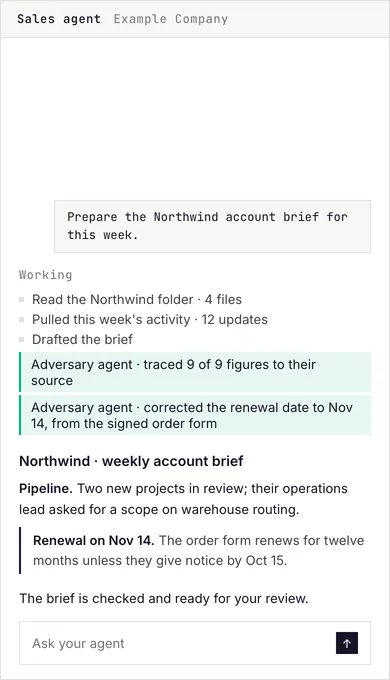
  1. The person asks their sales agent for the weekly account brief; the sales agent reads the account folder and the week's activity, an adversary agent traces every figure to its source and corrects a date, and the brief waits for review.01

    Ask for the work

    The sales agent drafts the account brief, and a second agent checks every figure.

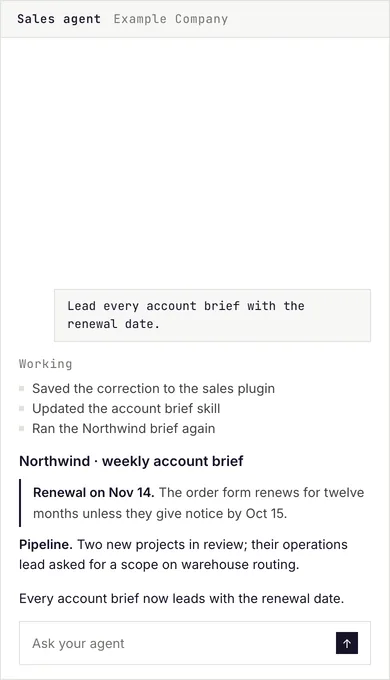
  2. The person asks their sales agent to lead every account brief with the renewal date; the agent saves the correction, updates the skill, and runs the brief again with the renewal first.02

    Correct it once

    You say what should lead, and the agent saves it to the skill.

  3. In the Build Master, a request from a capture session becomes a task row; its goal, knowledge, skill and checks fill in, and its status turns from manual to agentic.03

    It becomes a skill

    The correction joins the Build Master, so every later brief has it.

This example sets items; each of its items sets title, text, shot.

The settings for this example
{
  "type": "sticky-steps",
  "view": "visual-left",
  "items": [
    {
      "title": "Ask for the work",
      "text": "The sales agent drafts the account brief, and a second agent checks every figure.",
      "shot": "session-account"
    },
    {
      "title": "Correct it once",
      "text": "You say what should lead, and the agent saves it to the skill.",
      "shot": "session-correct"
    },
    {
      "title": "It becomes a skill",
      "text": "The correction joins the Build Master, so every later brief has it.",
      "shot": "build-master"
    }
  ]
}

Variant visual-right

The steps on the left and the picture held on the right, for a page that reads text first.

  1. In Claude Code, the person runs /ea-morning-brief; the executive assistant agent reads the calendar, ranks the inbox, pulls the action plate and checks the scorecard, then shows two figures below their line with the action for each, the day's meetings, and a draft to review.01

    The brief

    Your calendar, inbox and open items, ranked.

  2. In Claude Code, the person runs /bi-variance; the BI agent pulls yesterday's topline by brand and channel, compares it to last year and budget, and shows the variance table with the two lines that need attention and a draft to review.02

    The variance

    Yesterday against budget, with the lines that need you.

  3. In Claude Code, the person runs /bd-prospect-intel on a company; the sales agent reads its folder and the public record, finds two warm paths, scores the fit, and drafts a note through the warm path.03

    The deal read

    A prospect scored, with a warm path to them.

This example sets items; each of its items sets title, text, shot.

The settings for this example
{
  "type": "sticky-steps",
  "view": "visual-right",
  "items": [
    {
      "title": "The brief",
      "text": "Your calendar, inbox and open items, ranked.",
      "shot": "session-brief"
    },
    {
      "title": "The variance",
      "text": "Yesterday against budget, with the lines that need you.",
      "shot": "session-budget"
    },
    {
      "title": "The deal read",
      "text": "A prospect scored, with a warm path to them.",
      "shot": "session-intel"
    }
  ]
}

Options

OptionWhat it setsWhat it takesNeeded
itemsThe three to five steps, each a name, a line and the product shot held beside it.
Across its variants, each can hold: title, text, shot
a list of entriesAlways
progressShow the row of step markers under the picture, each one bringing its step to the middle; on unless set off.yes or noOptional
fadeChange the picture when a step reaches the middle (step), or fade it with the scroll itself where the brand allows it.one of: step, scrollOptional

Picture points

Ask for it as picture-points

Two to six numbered points on a product view, each opening a short note when the reader presses it, by pointer, touch or keyboard (Framer's Picture Points).

Variant numbered

Each point is a numbered square, and its note carries the same number, as in Framer's Picture Points.

The person asks their sales agent for the weekly account brief; the sales agent reads the account folder and the week's activity, an adversary agent traces every figure to its source and corrects a date, and the brief waits for review.
  1. Every figure checkedA second agent traces each figure to its source before anyone reads the brief.
  2. A date correctedThe renewal date came from the signed order form, not from memory.
  3. The renewal, set apartThe date the client must give notice by sits in its own box.

This example sets shot, points; each of its points sets x, y, title, text.

The settings for this example
{
  "type": "picture-points",
  "view": "numbered",
  "shot": "session-account",
  "points": [
    {
      "x": 92,
      "y": 45,
      "title": "Every figure checked",
      "text": "A second agent traces each figure to its source before anyone reads the brief."
    },
    {
      "x": 50,
      "y": 51,
      "title": "A date corrected",
      "text": "The renewal date came from the signed order form, not from memory."
    },
    {
      "x": 16,
      "y": 77,
      "title": "The renewal, set apart",
      "text": "The date the client must give notice by sits in its own box."
    }
  ]
}

Variant marked

Each point is a plus mark, for a view where numbers would suggest an order that is not there.

The person asks their sales agent to lead every account brief with the renewal date; the agent saves the correction, updates the skill, and runs the brief again with the renewal first.
  1. The correction savedThe agent writes your correction into the sales plugin.
  2. The renewal firstEvery account brief now opens with the renewal date.

This example sets shot, points; each of its points sets x, y, title, text.

The settings for this example
{
  "type": "picture-points",
  "view": "marked",
  "shot": "session-correct",
  "points": [
    {
      "x": 30,
      "y": 44,
      "title": "The correction saved",
      "text": "The agent writes your correction into the sales plugin."
    },
    {
      "x": 50,
      "y": 64,
      "title": "The renewal first",
      "text": "Every account brief now opens with the renewal date."
    }
  ]
}

Options

OptionWhat it setsWhat it takesNeeded
shotThe product shot the points sit on.wordsAlways
pointsThe two to six points, each its place across and down in percent, a name and a line.
Across its variants, each can hold: x, y, title, text
a list of entriesAlways
captionA line under the picture.wordsOptional

Drawn line

Ask for it as line-draw

A line drawing that draws itself once as it comes into view and then holds, joining a few named steps (Framer's Animator).

The standard form

Its one form.

  1. Ask
  2. Check
  3. Correct
The loop each agent runs: it does the work, a second agent checks it, and your correction goes back in.

This example sets drawing, labels, end, caption.

The settings for this example
{
  "type": "line-draw",
  "drawing": "loop",
  "labels": [
    "Ask",
    "Check",
    "Correct"
  ],
  "end": true,
  "caption": "The loop each agent runs: it does the work, a second agent checks it, and your correction goes back in."
}

Options

OptionWhat it setsWhat it takesNeeded
drawingWhich registered drawing it draws.one of: loop, loop-curvedAlways
labelsThe name over each step the line joins, 18 characters at most.a list of wordsAlways
captionA line under the drawing saying what it shows.wordsOptional
endMark where the line ends with a small green square.yes or noOptional
loopDraw it again and again, with a Pause control, where the brand allows it.yes or noOptional

Proof

Numbers, logos and results that show it works.

Logo row

Ask for it as logos

A row of company logos.

The standard form

Its one form.

AltruistRTB HouseInstone

This example sets items; each of its items sets src, alt.

The settings for this example
{
  "type": "logos",
  "items": [
    {
      "src": "/logos/altruist.svg",
      "alt": "Altruist"
    },
    {
      "src": "/logos/rtbhouse.svg",
      "alt": "RTB House"
    },
    {
      "src": "/logos/instone.svg",
      "alt": "Instone"
    }
  ]
}

Options

OptionWhat it setsWhat it takesNeeded
itemsThe things it shows, one per entry.
Across its variants, each can hold: src, alt
a list of entriesAlways

Proof numbers

Ask for it as stats

Three or four figures with their labels, such as clients, functions and agents.

The standard form

Its one form.

10
Industries
25+
Functions running on it
150+
Agents built for clients
300+
People with their own agent

This example sets items; each of its items sets value, label.

The settings for this example
{
  "type": "stats",
  "items": [
    {
      "value": "10",
      "label": "Industries"
    },
    {
      "value": "25+",
      "label": "Functions running on it"
    },
    {
      "value": "150+",
      "label": "Agents built for clients"
    },
    {
      "value": "300+",
      "label": "People with their own agent"
    }
  ]
}

Options

OptionWhat it setsWhat it takesNeeded
heldHold the figures between two rules.yes or noOptional
stillShow each figure at its value, with no count from zero: for figures that should simply be read.yes or noOptional
itemsThe things it shows, one per entry.
Across its variants, each can hold: value, label
a list of entriesAlways

Proof list

Ask for it as prooflist

A list of results, each with its evidence.

The standard form

Its one form.

Time to first agent
Agents run by month two.Company strategy
Adoption
Every person runs on them by month four.

This example sets items; each of its items sets kick, text, foot.

The settings for this example
{
  "type": "prooflist",
  "items": [
    {
      "kick": "Time to first agent",
      "text": "Agents run by month two.",
      "foot": "Company strategy"
    },
    {
      "kick": "Adoption",
      "text": "Every person runs on them by month four."
    }
  ]
}

Options

OptionWhat it setsWhat it takesNeeded
itemsThe things it shows, one per entry.
Across its variants, each can hold: kick, text, foot
a list of entriesAlways

Logo panel

Ask for it as logo-panel

Client logos in rows, inside a panel.

The standard form

Drawn this way when no variant is named.

Communication

GmailGoogle CalendarMicrosoft TeamsSlackGranola

Email and SMS

KlaviyoMailchimpAttentive

This example sets rows; each of its rows sets label, marks.

The settings for this example
{
  "type": "logo-panel",
  "rows": [
    {
      "label": "Communication",
      "marks": [
        [
          "wordmarks/gmail.svg",
          "Gmail",
          40,
          32
        ],
        [
          "wordmarks/googlecalendar.svg",
          "Google Calendar",
          30,
          32
        ],
        [
          "wordmarks/microsoftteams.svg",
          "Microsoft Teams",
          34,
          32
        ],
        [
          "wordmarks/slack.svg",
          "Slack",
          87,
          22
        ],
        [
          "wordmarks/granola.svg",
          "Granola",
          98,
          21
        ]
      ]
    },
    {
      "label": "Email and SMS",
      "marks": [
        [
          "wordmarks/klaviyo.svg",
          "Klaviyo",
          81,
          24
        ],
        [
          "wordmarks/mailchimp.svg",
          "Mailchimp",
          99,
          20
        ],
        [
          "wordmarks/attentive.svg",
          "Attentive",
          109,
          18
        ]
      ]
    }
  ]
}

Variant clients

The companies that run on the system, by their logos.

AltruistRTB HouseInstoneAdvanced DRISiren Creative

This example sets marks.

The settings for this example
{
  "type": "logo-panel",
  "view": "clients",
  "marks": [
    [
      "altruist.svg",
      "Altruist",
      106,
      29
    ],
    [
      "rtbhouse.svg",
      "RTB House",
      150,
      17
    ],
    [
      "instone.svg",
      "Instone",
      121,
      24
    ],
    [
      "addri.png",
      "Advanced DRI",
      84,
      35
    ],
    [
      "siren.svg",
      "Siren Creative",
      82,
      36
    ]
  ]
}

Options

OptionWhat it setsWhat it takesNeeded
rowsThe rows it shows, top to bottom.
Across its variants, each can hold: label, marks, text
a list of entriesOptional
marksThe logos it shows.a list of a list of a number or wordsOptional

Before and after

Ask for it as before-after

Two views of the same screen in one frame, with a divider the reader drags, clicks or moves with the arrow keys to compare them (Framer's Before-After Slide).

The standard form

Its one form.

After one correction: The person asks their sales agent to lead every account brief with the renewal date; the agent saves the correction, updates the skill, and runs the brief again with the renewal first.After one correctionFirst run: The person asks their sales agent for the weekly account brief; the sales agent reads the account folder and the week's activity, an adversary agent traces every figure to its source and corrects a date, and the brief waits for review.First run
Two runs of the Northwind brief in the same sales-agent screen: the first run, and the run after one correction, where the renewal date now leads. The request above each brief differs.

This example sets before, after, caption.

The settings for this example
{
  "type": "before-after",
  "before": {
    "shot": "session-account",
    "label": "First run"
  },
  "after": {
    "shot": "session-correct",
    "label": "After one correction"
  },
  "caption": "Two runs of the Northwind brief in the same sales-agent screen: the first run, and the run after one correction, where the renewal date now leads. The request above each brief differs."
}

Options

OptionWhat it setsWhat it takesNeeded
beforeThe first view: a product shot and its label.
Across its variants, each can hold: shot, label
a group of detailsAlways
afterThe second view of the same screen: a product shot of the same size and its label.
Across its variants, each can hold: shot, label
a group of detailsAlways
startWhere the divider starts, in percent from the left; 50 unless set.a numberOptional
captionThe line under the frame saying what changed.wordsAlways

Testimonials

What customers say, in their own words.

Testimonial slideshow

Ask for it as testimonial-slideshow

Client quotes one at a time, stepped by arrows, dots, a swipe or the arrow keys, and never on their own (Framer's Slideshow, as on its SaaS Kit and StackAI).

Variant centered

One quote at a time, centered, the person under it, arrows at the sides and dots below, on the page field.

“Our business is totally different now.”

We wanted to remove the routine work and free up people’s brains to think about how to improve the business. harperOS built the agents around how ADRI actually works and rolled them out to the whole team. Things that used to take days, if we could do them at all, now take five or ten minutes.

Greg BoatwrightCEO, Advanced DRIAdvanced DRI

“I now have an almost-too-good-to-be-true cockpit for my business.”

It updates me every day on the numbers and on my team’s outreach. And the knowledge about my business lives in files I own and control.

Mike LambPresident & CCO, RTB HouseRTB House

“Six weeks of work, done in three hours.”

I was about to hire someone for it, and now I don’t need to. I’m building my own automations now, and I’m learning so much.

Viral ShahCFO, Advanced DRIAdvanced DRI

“I’m building things myself now.”

My AR-collections agent runs the aging report, finds everyone past due, pulls each invoice and sends the email. That work used to take days, so it never got done.

Kevin GrotkeCEO, InstoneInstone

This example sets items; each of its items sets name, role, company, photo, logo, headline, quote.

The settings for this example
{
  "type": "testimonial-slideshow",
  "view": "centered",
  "items": [
    {
      "name": "Greg Boatwright",
      "role": "CEO",
      "company": "Advanced DRI",
      "photo": "/team-greg-boatwright.jpg",
      "logo": {
        "src": "/logos/addri-hires.png",
        "size": "lg"
      },
      "headline": "Our business is totally different now.",
      "quote": "We wanted to remove the routine work and free up people's brains to think about how to improve the business. harperOS built the agents around how ADRI actually works and rolled them out to the whole team. Things that used to take days, if we could do them at all, now take five or ten minutes."
    },
    {
      "name": "Mike Lamb",
      "role": "President & CCO",
      "company": "RTB House",
      "photo": "/team-ml-field.png",
      "logo": {
        "src": "/logos/rtbhouse.svg"
      },
      "headline": "I now have an almost-too-good-to-be-true cockpit for my business.",
      "quote": "It updates me every day on the numbers and on my team's outreach. And the knowledge about my business lives in files I own and control."
    },
    {
      "name": "Viral Shah",
      "role": "CFO",
      "company": "Advanced DRI",
      "photo": "/team-viral-shah.jpg",
      "logo": {
        "src": "/logos/addri-hires.png",
        "size": "lg"
      },
      "headline": "Six weeks of work, done in three hours.",
      "quote": "I was about to hire someone for it, and now I don't need to. I'm building my own automations now, and I'm learning so much."
    },
    {
      "name": "Kevin Grotke",
      "role": "CEO",
      "company": "Instone",
      "photo": "/team-kevin-grotke.jpg",
      "logo": {
        "src": "/logos/instone.svg",
        "size": "sm"
      },
      "headline": "I'm building things myself now.",
      "quote": "My AR-collections agent runs the aging report, finds everyone past due, pulls each invoice and sends the email. That work used to take days, so it never got done."
    }
  ]
}

Variant boxed

The same slideshow inside a bordered panel on the alternate field, for a section that needs it set apart.

“Our business is totally different now.”

We wanted to remove the routine work and free up people’s brains to think about how to improve the business. harperOS built the agents around how ADRI actually works and rolled them out to the whole team. Things that used to take days, if we could do them at all, now take five or ten minutes.

Greg BoatwrightCEO, Advanced DRIAdvanced DRI

“I now have an almost-too-good-to-be-true cockpit for my business.”

It updates me every day on the numbers and on my team’s outreach. And the knowledge about my business lives in files I own and control.

Mike LambPresident & CCO, RTB HouseRTB House

“Six weeks of work, done in three hours.”

I was about to hire someone for it, and now I don’t need to. I’m building my own automations now, and I’m learning so much.

Viral ShahCFO, Advanced DRIAdvanced DRI

“I’m building things myself now.”

My AR-collections agent runs the aging report, finds everyone past due, pulls each invoice and sends the email. That work used to take days, so it never got done.

Kevin GrotkeCEO, InstoneInstone

This example sets items; each of its items sets name, role, company, photo, logo, headline, quote.

The settings for this example
{
  "type": "testimonial-slideshow",
  "view": "boxed",
  "items": [
    {
      "name": "Greg Boatwright",
      "role": "CEO",
      "company": "Advanced DRI",
      "photo": "/team-greg-boatwright.jpg",
      "logo": {
        "src": "/logos/addri-hires.png",
        "size": "lg"
      },
      "headline": "Our business is totally different now.",
      "quote": "We wanted to remove the routine work and free up people's brains to think about how to improve the business. harperOS built the agents around how ADRI actually works and rolled them out to the whole team. Things that used to take days, if we could do them at all, now take five or ten minutes."
    },
    {
      "name": "Mike Lamb",
      "role": "President & CCO",
      "company": "RTB House",
      "photo": "/team-ml-field.png",
      "logo": {
        "src": "/logos/rtbhouse.svg"
      },
      "headline": "I now have an almost-too-good-to-be-true cockpit for my business.",
      "quote": "It updates me every day on the numbers and on my team's outreach. And the knowledge about my business lives in files I own and control."
    },
    {
      "name": "Viral Shah",
      "role": "CFO",
      "company": "Advanced DRI",
      "photo": "/team-viral-shah.jpg",
      "logo": {
        "src": "/logos/addri-hires.png",
        "size": "lg"
      },
      "headline": "Six weeks of work, done in three hours.",
      "quote": "I was about to hire someone for it, and now I don't need to. I'm building my own automations now, and I'm learning so much."
    },
    {
      "name": "Kevin Grotke",
      "role": "CEO",
      "company": "Instone",
      "photo": "/team-kevin-grotke.jpg",
      "logo": {
        "src": "/logos/instone.svg",
        "size": "sm"
      },
      "headline": "I'm building things myself now.",
      "quote": "My AR-collections agent runs the aging report, finds everyone past due, pulls each invoice and sends the email. That work used to take days, so it never got done."
    }
  ]
}

Variant logos

The centered slideshow with each company's logo as its control in place of the dots: every company in view at once, the one shown in ink and the rest gray.

“Our business is totally different now.”

We wanted to remove the routine work and free up people’s brains to think about how to improve the business. harperOS built the agents around how ADRI actually works and rolled them out to the whole team. Things that used to take days, if we could do them at all, now take five or ten minutes.

Greg BoatwrightCEO, Advanced DRIAdvanced DRI

“I now have an almost-too-good-to-be-true cockpit for my business.”

It updates me every day on the numbers and on my team’s outreach. And the knowledge about my business lives in files I own and control.

Mike LambPresident & CCO, RTB HouseRTB House

“Six weeks of work, done in three hours.”

I was about to hire someone for it, and now I don’t need to. I’m building my own automations now, and I’m learning so much.

Viral ShahCFO, Advanced DRIAdvanced DRI

“I’m building things myself now.”

My AR-collections agent runs the aging report, finds everyone past due, pulls each invoice and sends the email. That work used to take days, so it never got done.

Kevin GrotkeCEO, InstoneInstone

This example sets items; each of its items sets name, role, company, photo, logo, headline, quote.

The settings for this example
{
  "type": "testimonial-slideshow",
  "view": "logos",
  "items": [
    {
      "name": "Greg Boatwright",
      "role": "CEO",
      "company": "Advanced DRI",
      "photo": "/team-greg-boatwright.jpg",
      "logo": {
        "src": "/logos/addri-hires.png",
        "size": "lg"
      },
      "headline": "Our business is totally different now.",
      "quote": "We wanted to remove the routine work and free up people's brains to think about how to improve the business. harperOS built the agents around how ADRI actually works and rolled them out to the whole team. Things that used to take days, if we could do them at all, now take five or ten minutes."
    },
    {
      "name": "Mike Lamb",
      "role": "President & CCO",
      "company": "RTB House",
      "photo": "/team-ml-field.png",
      "logo": {
        "src": "/logos/rtbhouse.svg"
      },
      "headline": "I now have an almost-too-good-to-be-true cockpit for my business.",
      "quote": "It updates me every day on the numbers and on my team's outreach. And the knowledge about my business lives in files I own and control."
    },
    {
      "name": "Viral Shah",
      "role": "CFO",
      "company": "Advanced DRI",
      "photo": "/team-viral-shah.jpg",
      "logo": {
        "src": "/logos/addri-hires.png",
        "size": "lg"
      },
      "headline": "Six weeks of work, done in three hours.",
      "quote": "I was about to hire someone for it, and now I don't need to. I'm building my own automations now, and I'm learning so much."
    },
    {
      "name": "Kevin Grotke",
      "role": "CEO",
      "company": "Instone",
      "photo": "/team-kevin-grotke.jpg",
      "logo": {
        "src": "/logos/instone.svg",
        "size": "sm"
      },
      "headline": "I'm building things myself now.",
      "quote": "My AR-collections agent runs the aging report, finds everyone past due, pulls each invoice and sends the email. That work used to take days, so it never got done."
    }
  ]
}

Options

OptionWhat it setsWhat it takesNeeded
itemsThe people quoted, one slide each: name, role, company, portrait, logo and their words.
Across its variants, each can hold: name, role, company, photo, logo, headline, quote
a list of entriesAlways
autoplaySlide to the next quote on its own every 2 seconds, with the shown logo's bar filling as the timer; it pauses on hover, on focus and off screen and resumes where it stopped, stops for good once the reader uses a control, carries a Pause button, and never moves under reduced motion. The logos view only.yes or noOptional
labelA small label above it, or the name a screen reader announces.wordsOptional

Portrait row

Ask for it as portrait-row

Several named clients side by side in a row a reader swipes or steps through, so many companies show at once (Framer's Carousel; StackAI's executive row).

Variant quote

Each card holds the person's portrait, their headline line, and their name, role and company.

  • Advanced DRI
    “Our business is totally different now.”
    Greg BoatwrightCEO, Advanced DRI
  • RTB House
    “I now have an almost-too-good-to-be-true cockpit for my business.”
    Mike LambPresident & CCO, RTB House
  • Advanced DRI
    “Six weeks of work, done in three hours.”
    Viral ShahCFO, Advanced DRI
  • Instone
    “I’m building things myself now.”
    Kevin GrotkeCEO, Instone

This example sets items; each of its items sets name, role, company, photo, logo, headline, quote.

The settings for this example
{
  "type": "portrait-row",
  "view": "quote",
  "items": [
    {
      "name": "Greg Boatwright",
      "role": "CEO",
      "company": "Advanced DRI",
      "photo": "/team-greg-boatwright.jpg",
      "logo": {
        "src": "/logos/addri-hires.png",
        "size": "lg"
      },
      "headline": "Our business is totally different now.",
      "quote": "We wanted to remove the routine work and free up people's brains to think about how to improve the business. harperOS built the agents around how ADRI actually works and rolled them out to the whole team. Things that used to take days, if we could do them at all, now take five or ten minutes."
    },
    {
      "name": "Mike Lamb",
      "role": "President & CCO",
      "company": "RTB House",
      "photo": "/team-ml-field.png",
      "logo": {
        "src": "/logos/rtbhouse.svg"
      },
      "headline": "I now have an almost-too-good-to-be-true cockpit for my business.",
      "quote": "It updates me every day on the numbers and on my team's outreach. And the knowledge about my business lives in files I own and control."
    },
    {
      "name": "Viral Shah",
      "role": "CFO",
      "company": "Advanced DRI",
      "photo": "/team-viral-shah.jpg",
      "logo": {
        "src": "/logos/addri-hires.png",
        "size": "lg"
      },
      "headline": "Six weeks of work, done in three hours.",
      "quote": "I was about to hire someone for it, and now I don't need to. I'm building my own automations now, and I'm learning so much."
    },
    {
      "name": "Kevin Grotke",
      "role": "CEO",
      "company": "Instone",
      "photo": "/team-kevin-grotke.jpg",
      "logo": {
        "src": "/logos/instone.svg",
        "size": "sm"
      },
      "headline": "I'm building things myself now.",
      "quote": "My AR-collections agent runs the aging report, finds everyone past due, pulls each invoice and sends the email. That work used to take days, so it never got done."
    }
  ]
}

Variant people

Each card holds the portrait, name, role and company only, as StackAI's row of executives does.

  • Advanced DRI
    Greg BoatwrightCEO, Advanced DRI
  • RTB House
    Mike LambPresident & CCO, RTB House
  • Advanced DRI
    Viral ShahCFO, Advanced DRI
  • Instone
    Kevin GrotkeCEO, Instone

This example sets items; each of its items sets name, role, company, photo, logo, headline, quote.

The settings for this example
{
  "type": "portrait-row",
  "view": "people",
  "items": [
    {
      "name": "Greg Boatwright",
      "role": "CEO",
      "company": "Advanced DRI",
      "photo": "/team-greg-boatwright.jpg",
      "logo": {
        "src": "/logos/addri-hires.png",
        "size": "lg"
      },
      "headline": "Our business is totally different now.",
      "quote": "We wanted to remove the routine work and free up people's brains to think about how to improve the business. harperOS built the agents around how ADRI actually works and rolled them out to the whole team. Things that used to take days, if we could do them at all, now take five or ten minutes."
    },
    {
      "name": "Mike Lamb",
      "role": "President & CCO",
      "company": "RTB House",
      "photo": "/team-ml-field.png",
      "logo": {
        "src": "/logos/rtbhouse.svg"
      },
      "headline": "I now have an almost-too-good-to-be-true cockpit for my business.",
      "quote": "It updates me every day on the numbers and on my team's outreach. And the knowledge about my business lives in files I own and control."
    },
    {
      "name": "Viral Shah",
      "role": "CFO",
      "company": "Advanced DRI",
      "photo": "/team-viral-shah.jpg",
      "logo": {
        "src": "/logos/addri-hires.png",
        "size": "lg"
      },
      "headline": "Six weeks of work, done in three hours.",
      "quote": "I was about to hire someone for it, and now I don't need to. I'm building my own automations now, and I'm learning so much."
    },
    {
      "name": "Kevin Grotke",
      "role": "CEO",
      "company": "Instone",
      "photo": "/team-kevin-grotke.jpg",
      "logo": {
        "src": "/logos/instone.svg",
        "size": "sm"
      },
      "headline": "I'm building things myself now.",
      "quote": "My AR-collections agent runs the aging report, finds everyone past due, pulls each invoice and sends the email. That work used to take days, so it never got done."
    }
  ]
}

Options

OptionWhat it setsWhat it takesNeeded
itemsThe people in the row, one card each: name, role, company, portrait, logo and their words.
Across its variants, each can hold: name, role, company, photo, logo, headline, quote
a list of entriesAlways
labelA small label above it, or the name a screen reader announces.wordsOptional

Pricing

What it costs and on what terms.

Price

Ask for it as price

A price with its period, a lede and its terms.

The standard form

Its one form.

$X,XXX a month

One monthly fee for the build, then month to month by tier.

SeatsNever priced per seat
Notice30 days after month four

This example sets amount, per, lede, terms; each of its terms sets label, value.

The settings for this example
{
  "type": "price",
  "amount": "$X,XXX",
  "per": " a month",
  "lede": "One monthly fee for the build, then month to month by tier.",
  "terms": [
    {
      "label": "Seats",
      "value": "Never priced per seat"
    },
    {
      "label": "Notice",
      "value": "30 days after month four"
    }
  ]
}

Options

OptionWhat it setsWhat it takesNeeded
amountThe price.wordsAlways
perWhat the price is for, such as a month.wordsAlways
ledeThe line that says what it is about.wordsAlways
bodyThe text under the title.wordsOptional
boxesDraw its parts as boxes: linked to their details, or plain.
Across its variants, each can hold: kick, price, bullets
a list of entriesOptional
termsHeadThe heading over the terms.wordsOptional
termsThe terms, each a label and a value.
Across its variants, each can hold: label, value
a list of entriesOptional

Calls to action

The invitation to take the next step.

Call to action

Ask for it as cta

The closing invitation: a kicker, a title, a line and one button.

The standard form

Its one form.

This example sets href, kick, title, body.

The settings for this example
{
  "type": "cta",
  "href": "https://calendar.notion.so/meet/mchauliac/harperos",
  "kick": "The next step",
  "title": "Book a demo",
  "body": "We show you the system at work, and what it would look like in your company."
}

Options

OptionWhat it setsWhat it takesNeeded
hrefWhere the button goes.a linkAlways
kickThe small label above the title.wordsAlways
titleThe title.wordsAlways
bodyThe text under the title.wordsAlways
overrideReplace the standard closing words for this page.wordsOptional

Forms

Questions a visitor answers and sends.

Form

Ask for it as form

A form a visitor fills in and submits, declared once in content/forms/forms.mjs.

The standard form

Its one form.

1Your name
2What would help most? Optional

This example sets endpoint, submit, thanks, fields; each of its fields sets kind, name, label, required, rows.

The settings for this example
{
  "type": "form",
  "endpoint": "/api/feedback",
  "submit": "Send",
  "thanks": {
    "title": "Thank you.",
    "body": "Your answers are in."
  },
  "fields": [
    {
      "kind": "text",
      "name": "name",
      "label": "Your name",
      "required": true
    },
    {
      "kind": "textarea",
      "name": "note",
      "rows": 3,
      "label": "What would help most?"
    }
  ]
}

Options

OptionWhat it setsWhat it takesNeeded
formWhich declared form it is, by its name in the form register; the register sets its questions and where they go.wordsOptional
endpointWhere the answers are sent.a linkOptional
keyA public key sent with each answer, for a form that posts straight to the database.wordsOptional
hiddenValues sent with the answers that the reader never sees, such as which page they signed up on.as in the example's settingsOptional
numberedNumber each question.yes or noOptional
submitThe button's words.wordsAlways
nextThe page the reader goes to after sending.wordsOptional
fieldsThe questions it asks, in order.
Across its variants, each can hold: kind, name, required, placeholder, label, options, rows, from, to, hint, error, autocomplete, text
a list of entriesAlways
thanksWhat the reader sees after sending, when there is no next page.
Across its variants, each can hold: title, body
a group of detailsOptional

Text

Running text, lists, notes and the questions a reader asks.

Paragraph

Ask for it as body

A paragraph of running text under a heading.

The standard form

Its one form.

Every correction your team makes is written down once, and every agent works from it the next morning.

This example sets text.

The settings for this example
{
  "type": "body",
  "text": "Every correction your team makes is written down once, and every agent works from it the next morning."
}

Options

OptionWhat it setsWhat it takesNeeded
textThe words it shows.wordsAlways

Bullet list

Ask for it as list

Several short points a reader scans, with an optional label.

The standard form

Its one form.

  • We needed growth and could not add the headcount.
  • We built the system, and the method that fills it.

This example sets items.

The settings for this example
{
  "type": "list",
  "items": [
    "We needed growth and could not add the headcount.",
    "We built the system, and the method that fills it."
  ]
}

Options

OptionWhat it setsWhat it takesNeeded
itemsThe points, each a whole sentence.a list of wordsAlways
labelA small label above it, or the name a screen reader announces.wordsOptional

Action list

Ask for it as actions

Next steps a reader takes, each with its owner.

The standard form

Its one form.

This example sets items; each of its items sets label, kind, href.

The settings for this example
{
  "type": "actions",
  "items": [
    {
      "label": "Book free assessment",
      "kind": "primary",
      "href": "https://calendar.notion.so/meet/mchauliac/harperos"
    },
    {
      "label": "Read our thinking",
      "kind": "ghost",
      "href": "/articles"
    },
    {
      "label": "The Block Library",
      "kind": "link",
      "href": "/design-system/blocks"
    }
  ]
}

Options

OptionWhat it setsWhat it takesNeeded
itemsThe things it shows, one per entry.
Across its variants, each can hold: kind, label, href
a list of entriesAlways

Story

Ask for it as story

Long-form narrative paragraphs, for a case or an article.

The standard form

Its one form.

At a global digital assets firm, our founder wore three hats. Hiring wasn’t an option, so he became his own Chief AI Officer.

Over 24 months, he studied, tested, and built. That work became harperOS.

This example sets paragraphs.

The settings for this example
{
  "type": "story",
  "paragraphs": [
    "At a global digital assets firm, our founder wore three hats. Hiring wasn't an option, so he became his own Chief AI Officer.",
    "Over 24 months, he studied, tested, and built. That work became harperOS."
  ]
}

Options

OptionWhat it setsWhat it takesNeeded
paragraphsThe paragraphs, two to eight, each short.a list of wordsAlways

Byline

Ask for it as byline

Who wrote a piece and when, with their photo.

The standard form

Drawn this way when no variant is named.

This example sets name, role, photo, date.

The settings for this example
{
  "type": "byline",
  "name": "Michael Chauliac",
  "role": "Co-Founder & CEO",
  "photo": {
    "src": "/team-mc-v4.jpg",
    "alt": "Michael Chauliac"
  },
  "date": "Sep 4, 2026"
}

Variant signoff

Closes a piece with the same author who opened it.

Written by

Michael ChauliacCo-Founder & CEO

This example sets label, name, role.

The settings for this example
{
  "type": "byline",
  "view": "signoff",
  "label": "Written by",
  "name": "Michael Chauliac",
  "role": "Co-Founder & CEO"
}

Options

OptionWhat it setsWhat it takesNeeded
nameThe author's name.wordsAlways
roleThe person's role, under their name.wordsAlways
photoThe person's portrait and the name it shows.
Across its variants, each can hold: src, alt
a group of detailsOptional
dateThe date.wordsOptional
labelA small label above it, or the name a screen reader announces.wordsOptional

Note

Ask for it as note

A short aside the reader should not miss.

The standard form

Its one form.

Every figure on this page is an example.

This example sets text.

The settings for this example
{
  "type": "note",
  "text": "Every figure on this page is an example."
}

Options

OptionWhat it setsWhat it takesNeeded
textThe words it shows.wordsAlways

Subheading

Ask for it as subhead

A heading inside a section, below the section heading.

The standard form

Its one form.

How the system learns

This example sets text.

The settings for this example
{
  "type": "subhead",
  "text": "How the system learns"
}

Options

OptionWhat it setsWhat it takesNeeded
textThe words it shows.wordsAlways
glyphA small up, down or open marker before the words.wordsOptional
level3 for a heading inside a section, 4 for one level below.a numberOptional
tightNo space above, when it follows a level marker.yes or noOptional

Chips

Ask for it as chips

Short labels in a row, such as tools or tags.

The standard form

Drawn this way when no variant is named.

GmailSlackGoogle DriveSalesforce

This example sets items.

The settings for this example
{
  "type": "chips",
  "items": [
    "Gmail",
    "Slack",
    "Google Drive",
    "Salesforce"
  ]
}

Variant caption

A labeled row naming what something is set against.

Missing sourceStale figureUnsupported claim

This example sets items.

The settings for this example
{
  "type": "chips",
  "view": "caption",
  "items": [
    "Missing source",
    "Stale figure",
    "Unsupported claim"
  ]
}

Variant tools

The row of connected systems.

GmailSlackGoogle DriveSalesforce

This example sets items.

The settings for this example
{
  "type": "chips",
  "view": "tools",
  "items": [
    "Gmail",
    "Slack",
    "Google Drive",
    "Salesforce"
  ]
}

Options

OptionWhat it setsWhat it takesNeeded
itemsThe things it shows, one per entry.a list of wordsAlways

Caveat

Ask for it as caveat

A condition or limit the reader must know, with a kicker.

The standard form

Its one form.

Before you read

Every figure on this page is an example, not a quote.

This example sets kick, text.

The settings for this example
{
  "type": "caveat",
  "kick": "Before you read",
  "text": "Every figure on this page is an example, not a quote."
}

Options

OptionWhat it setsWhat it takesNeeded
kickThe small label above the title.wordsAlways
textThe words it shows.wordsAlways

Pull quote

Ask for it as pull

A line from the text, set large to stop a skimming reader.

The standard form

Its one form.

The system takes the work, and the person moves up.

This example sets text.

The settings for this example
{
  "type": "pull",
  "text": "The system takes the work, and the person moves up."
}

Options

OptionWhat it setsWhat it takesNeeded
textThe words it shows.wordsAlways

Sublabel

Ask for it as sublab

A small label above a group of blocks.

The standard form

Its one form.

How it works

This example sets text.

The settings for this example
{
  "type": "sublab",
  "text": "How it works"
}

Options

OptionWhat it setsWhat it takesNeeded
textThe words it shows.wordsAlways

Questions and answers

Ask for it as faq

Three to six questions a reader asks before acting, each answer closed under its question until opened.

The standard form

Its one form.

How long does it take?

Your agents run by month two, and every person runs on them by month four.

Who owns what you build?

You do: the knowledge, the skills and the agents are yours.

Do we need an AI team?

No. Your AI engineer comes with the service.

This example sets items; each of its items sets q, a.

The settings for this example
{
  "type": "faq",
  "items": [
    {
      "q": "How long does it take?",
      "a": "Your agents run by month two, and every person runs on them by month four."
    },
    {
      "q": "Who owns what you build?",
      "a": "You do: the knowledge, the skills and the agents are yours."
    },
    {
      "q": "Do we need an AI team?",
      "a": "No. Your AI engineer comes with the service."
    }
  ]
}

Options

OptionWhat it setsWhat it takesNeeded
itemsThe things it shows, one per entry.
Across its variants, each can hold: q, a
a list of entriesAlways

Facts and tables

Facts, comparisons and tables of figures.

Table

Ask for it as table

Rows and columns of comparable facts, stacking on a phone.

The standard form

Drawn this way when no variant is named.

Dedicated knowledgeEach agent reads from a defined slice of the knowledge layer.
Tool accessScoped access to the systems the function needs.

This example sets rows.

The settings for this example
{
  "type": "table",
  "rows": [
    [
      "Dedicated knowledge",
      "Each agent reads from a defined slice of the knowledge layer."
    ],
    [
      "Tool access",
      "Scoped access to the systems the function needs."
    ]
  ]
}

Variant report

A dense data table for report pages, with numbers aligned when numeric.

What you gainWhat you risk
Lower effortFaster turns, lower cost, less scope creepA confident answer that missed the one thing worth checking
Higher effortDeeper checking, more rigorous workLonger turns, higher cost, and tidying or exploring nobody asked for

This example sets head, rows.

The settings for this example
{
  "type": "table",
  "view": "report",
  "head": [
    "",
    "What you gain",
    "What you risk"
  ],
  "rows": [
    [
      "**Lower effort**",
      "Faster turns, lower cost, less scope creep",
      "A confident answer that missed the one thing worth checking"
    ],
    [
      "**Higher effort**",
      "Deeper checking, more rigorous work",
      "Longer turns, higher cost, and tidying or exploring nobody asked for"
    ]
  ]
}

Options

OptionWhat it setsWhat it takesNeeded
headThe column headings.a list of wordsOptional
rowsThe rows it shows, top to bottom, each a list of its cells.a list of a list of as in the example's settingsAlways
labelA small label above it, or the name a screen reader announces.wordsOptional
highlightWhich column is the subject and takes the accent.a numberOptional
widthsA fixed width for each column.a list of wordsOptional
numericAlign the cells as numbers.yes or noOptional
rightAlignLastAlign the last column to the right, for amounts.yes or noOptional
firstSet it with no space above, when it opens a section.yes or noOptional

Facts list

Ask for it as meta

Label-and-value pairs, such as dates, owners and status.

The standard form

Its one form.

Prepared for
The reader’s company
The reader’s name and role
Prepared by
Michael Chauliac · harperOS
Date
September 2026

This example sets pairs; each of its pairs sets label, name, value.

The settings for this example
{
  "type": "meta",
  "pairs": [
    {
      "label": "Prepared for",
      "name": "The reader's company",
      "value": "The reader's name and role"
    },
    {
      "label": "Prepared by",
      "value": "Michael Chauliac · harperOS"
    },
    {
      "label": "Date",
      "value": "September 2026"
    }
  ]
}

Options

OptionWhat it setsWhat it takesNeeded
pairsThe facts it lists, each a label and a value.
Across its variants, each can hold: label, value, name, today
a list of entriesAlways

Severity marker

Ask for it as sev

A level marker on a finding (used on one page).

The standard form

Its one form.

High

This example sets level.

The settings for this example
{
  "type": "sev",
  "level": "High"
}

Options

OptionWhat it setsWhat it takesNeeded
levelHigh or Medium.wordsAlways

Comparison

Ask for it as compare

Two or more options side by side, row by row.

The standard form

Its one form.

TodayWith the system
Knowledge
In people’s heads and inboxes.
Written down, owned by the company.
New hires
Learn by asking around for months.
Run on the same agents from week one.

This example sets head, rows; each of its rows sets key, from, to.

The settings for this example
{
  "type": "compare",
  "head": [
    "Today",
    "With the system"
  ],
  "rows": [
    {
      "key": "Knowledge",
      "from": "In people's heads and inboxes.",
      "to": "Written down, owned by the company."
    },
    {
      "key": "New hires",
      "from": "Learn by asking around for months.",
      "to": "Run on the same agents from week one."
    }
  ]
}

Options

OptionWhat it setsWhat it takesNeeded
headThe column headings.a list of wordsAlways
rowsThe rows it shows, top to bottom.
Across its variants, each can hold: key, from, to
a list of entriesAlways

Lists of pages

Links to articles, courses and other pages.

Entries

Ask for it as entries

A list of linked pages or articles, each with a title and a line, as a list, tabs or feature tiles.

The standard form

Drawn this way when no variant is named.

This example sets items; each of its items sets kick, title, text, href.

The settings for this example
{
  "type": "entries",
  "items": [
    {
      "kick": "Sep 4, 2026",
      "title": "The system takes the work, and the person moves up",
      "text": "What happens to the day once the routine work is gone.",
      "href": "#"
    },
    {
      "kick": "Aug 27, 2026",
      "title": "You bought the tool. Now what?",
      "text": "Why a seat is not a system.",
      "href": "#"
    }
  ]
}

Variant course

One card per course, its numbered lessons and a start link.

Everyone

01
Orient

The complete picture: the machine, what it can do, how to work it.

  1. 01How the system works
  2. 02What I can do for you
Start course2 modules

Weekly operators

02
Operate

The craft on top of the operating model.

  1. 01The power moves
  2. 02Writing well in the system
Start course2 modules

This example sets items; each of its items sets kick, num, title, text, href, unit, lessons.

The settings for this example
{
  "type": "entries",
  "view": "course",
  "items": [
    {
      "kick": "Everyone",
      "num": "01",
      "title": "Orient",
      "text": "The complete picture: the machine, what it can do, how to work it.",
      "href": "#",
      "unit": "modules",
      "lessons": [
        {
          "title": "How the system works",
          "href": "#"
        },
        {
          "title": "What I can do for you",
          "href": "#"
        }
      ]
    },
    {
      "kick": "Weekly operators",
      "num": "02",
      "title": "Operate",
      "text": "The craft on top of the operating model.",
      "href": "#",
      "unit": "modules",
      "lessons": [
        {
          "title": "The power moves",
          "href": "#"
        },
        {
          "title": "Writing well in the system",
          "href": "#"
        }
      ]
    }
  ]
}

Variant feature

The two or three newest entries as cards in one row, for an index that leads with its best.

This example sets items; each of its items sets kick, title, text, href.

The settings for this example
{
  "type": "entries",
  "view": "feature",
  "items": [
    {
      "kick": "Apr 28, 2026",
      "title": "Two years working inside AI",
      "text": "Ten principles I keep coming back to.",
      "href": "#"
    },
    {
      "kick": "Apr 16, 2026",
      "title": "Train your AI like an employee",
      "text": "The hiring analogy that makes AI deployment click.",
      "href": "#"
    },
    {
      "kick": "Apr 7, 2026",
      "title": "SOPs are dead",
      "text": "The most useful knowledge in your company has never been written down.",
      "href": "#"
    }
  ]
}

Variant lead

The one post a blog index opens on, as a large dark card.

This example sets items; each of its items sets kick, title, text, href.

The settings for this example
{
  "type": "entries",
  "view": "lead",
  "items": [
    {
      "kick": "Essay · Apr 28, 2026",
      "title": "Two years working inside AI: the foundation",
      "text": "Ten principles I keep coming back to.",
      "href": "#"
    }
  ]
}

Variant table

Dated pieces in an archive: the date, an optional category and the title.

This example sets items; each of its items sets kick, cat, title, href.

The settings for this example
{
  "type": "entries",
  "view": "table",
  "items": [
    {
      "kick": "Mar 31, 2026",
      "cat": "Essay",
      "title": "You bought the tool. Now what?",
      "href": "#"
    },
    {
      "kick": "Dec 1, 2025",
      "cat": "Press release",
      "title": "harperOS launches: the first true AI OS",
      "href": "#"
    }
  ]
}

Variant tabs

Posts by category, one tab per group, each card carrying its kicker and title.

This example sets groups; each of its groups sets label, items.

The settings for this example
{
  "type": "entries",
  "view": "tabs",
  "groups": [
    {
      "label": "Essays",
      "items": [
        {
          "kick": "Sep 20, 2026",
          "title": "A post on running a company on AI, number 1",
          "source": "Michael Chauliac",
          "href": "#"
        },
        {
          "kick": "Sep 19, 2026",
          "title": "A post on running a company on AI, number 2",
          "source": "Michael Chauliac",
          "href": "#"
        },
        {
          "kick": "Sep 18, 2026",
          "title": "A post on running a company on AI, number 3",
          "source": "Michael Chauliac",
          "href": "#"
        },
        {
          "kick": "Sep 17, 2026",
          "title": "A post on running a company on AI, number 4",
          "source": "Michael Chauliac",
          "href": "#"
        },
        {
          "kick": "Sep 16, 2026",
          "title": "A post on running a company on AI, number 5",
          "source": "Michael Chauliac",
          "href": "#"
        },
        {
          "kick": "Sep 15, 2026",
          "title": "A post on running a company on AI, number 6",
          "source": "Michael Chauliac",
          "href": "#"
        },
        {
          "kick": "Sep 14, 2026",
          "title": "A post on running a company on AI, number 7",
          "source": "Michael Chauliac",
          "href": "#"
        },
        {
          "kick": "Sep 13, 2026",
          "title": "A post on running a company on AI, number 8",
          "source": "Michael Chauliac",
          "href": "#"
        },
        {
          "kick": "Sep 12, 2026",
          "title": "A post on running a company on AI, number 9",
          "source": "Michael Chauliac",
          "href": "#"
        },
        {
          "kick": "Sep 11, 2026",
          "title": "A post on running a company on AI, number 10",
          "source": "Michael Chauliac",
          "href": "#"
        },
        {
          "kick": "Sep 10, 2026",
          "title": "A post on running a company on AI, number 11",
          "source": "Michael Chauliac",
          "href": "#"
        }
      ]
    },
    {
      "label": "In the press",
      "items": [
        {
          "kick": "Sep 29, 2026",
          "title": "OpenAI launches Dots, its agentic avatar",
          "source": "TechCrunch",
          "href": "https://techcrunch.com/"
        }
      ]
    }
  ]
}

Options

OptionWhat it setsWhat it takesNeeded
openShow the newest three as open items under the lead.yes or noOptional
itemsThe things it shows, one per entry.
Across its variants, each can hold: kick, title, text, href, label, cat, num, start, unit, lessons
a list of entriesOptional
groupsThe groups it holds, each with its own heading.
Across its variants, each can hold: label, items
a list of entriesOptional

The theme

One file carries the whole brand.

Every section reads these values. Change one in the theme, and every page changes with it.

Colors

Text

--ink

Quieter text

--ink-muted

Captions

--ink-subtle

Accent

--accent

Accent on text

--accent-text

Accent wash

--accent-soft

Page

--field

Boxes

--alt

Lines

--rule

Soft lines

--rule-soft

Type

Page title, on a document
--type-title

The company gets faster.

Section title, on a document
--type-section

The company gets faster.

A titled part inside a section
--type-subsection

The company gets faster.

The line under a title
--type-lede

The company gets faster.

A step's name
--type-step

The company gets faster.

A card's title
--type-card-title

The company gets faster.

A figure
--type-figure

300+

A price
--type-price

$X,XXX

Page title
--type-site-title

The company gets faster.

Section title
--type-site-section

The company gets faster.

Chapter title
--type-chapter

The company gets faster.

The line under a chapter title
--type-chapter-lede

The company gets faster.

Section title, on a dense report
--type-section-dense

The company gets faster.

A large figure
--type-figure-large

300+

A question, or an open entry's title
--type-entry-title

The company gets faster.

An agent's name
--type-agent-name

The company gets faster.

Space

--s1
--s2
--s3
--s4
--s5
--s6
--s7
--s8
--s9
--s10

Corners

--radius